

If you’ve ever dealt with MS/TP issues, you know they can be a massive headache. When MS/TP’s acting up, it means getting boots on the ground, clambering around in ceiling tiles, and troubleshooting section after section of network. It’s tedious, time-consuming, and frustrating.
To help relieve that frustration, we recently hosted a mini-webinar on solving major MS/TP issues. Watch our MS/TP webinar, or read on for our guide to finding, understanding, and fixing MS/TP.
What causes MS/TP issues?
Most MS/TP networks have at least some issues. More often than not, those issues are caused by a physical wiring problem. They can also be configuration issues, but those are much more rare. Whatever the case, tokens can’t pass and that causes problems on the network.
How does bad wiring happen?
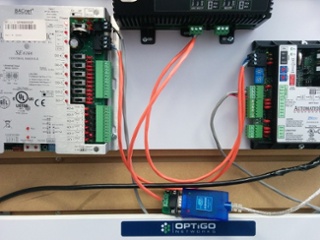
One of the number one issues is simply bad wiring. Maybe the electrician or subcontractor threw the network in and wasn’t paying attention. They might just not understand the network and its criticalities. So something goes wrong in the wiring, and then the tech is responsible for fixing whatever went wrong.
Flipping polarity is another big issue. Maybe when you were going from one MS/TP device to the next device, the wires inadvertently got flipped. Or, even worse, if you extended your wires through a junction box, the colour of the wire changed and you’re not sure which wire is which.
Loose wiring is extremely common. That’s an easy one to identify if you’re physically at the device: oftentimes, the second you touch the wire it will fall right out of the terminal. These loose wires can ground on any metal that’s around the device, or they can short by touching the opposite terminal. Loose wiring might be a result of bad design or loose terminals. Either the connector itself has a bad design, or vibrations cause the terminal to slowly back out. Problems with loose wiring will manifest over time, and won’t always show up right away during installation.
Wire preparation is absolutely key in MS/TP. You want to twist and terminate wires well. You want to ensure there are no loose strands. You want to make sure your insulation is stripped back far enough so you can actually connect. All these separate components might seem insignificant, but they’re critical. Miss just one and it will mess with your network.
As previously mentioned, software configuration could also be an issue. You might have duplicate device IDs or duplicate MAC addresses, or a max master that’s set too high. If you can’t bring a device up on your network or your MS/TP chain performance is not what you expect, you should start looking at the configurations for potential issues.
How do you fix it?
Finding the problem
First and foremost, you’ve got to figure out that you have an issue. Field complaints coming in from an occupied building will be one of the best ways to pinpoint problems. If the lights or the heating are erratic, occupants will let you know.
Inconsistency in general is another sign of MS/TP issues. The network’s up, the network’s down; you get some data exchange, you get none; controllers go online and offline. It’s usually not just one specific device that’s drawing attention to itself by going on and offline, it’s many different devices acting erratically.
Pinpointing the device
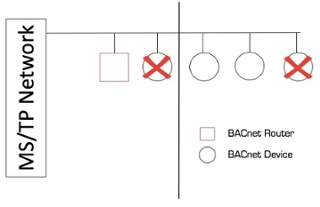
One of the go-to ways to find the problem device is to start splitting your network. Plug into the network, cut it in half, then test one side and the other. Keep working your way down until you find the issue.
This method works, but it’s very time-consuming and intrusive. All these devices are normally in the ceiling, so might have to work after office hours to avoid disrupting occupants.
An alternative is using tools like Wireshark or Visual BACnet. Visual BACnet is an advanced visualization tool for building automation. All you need to do is capture the packets on the network through Wireshark or our capture tool, and Visual BACnet will analyze the token passing. The program has three diagnostic checks specifically for MS/TP issues, to pinpoint where tokens aren’t being passed. By looking at token disruptions, and drawing out the token roundtrips, you can pinpoint the problematic devices. Once you know where the problem is, you can start pulling on wires and checking configurations.
Fixing the issue
Track the terminations and fix them if they’re a problem. Definitely watch your terminations, because that’s likely where your issues are going to be. If all your wiring is properly terminated and connected, then start looking at your configurations.
There you have it! Hopefully MS/TP problems aren’t messing up your network, but if they are, this should help you dive in, diagnose, and fix MS/TP.
Watch our MS/TP webinar for more!